
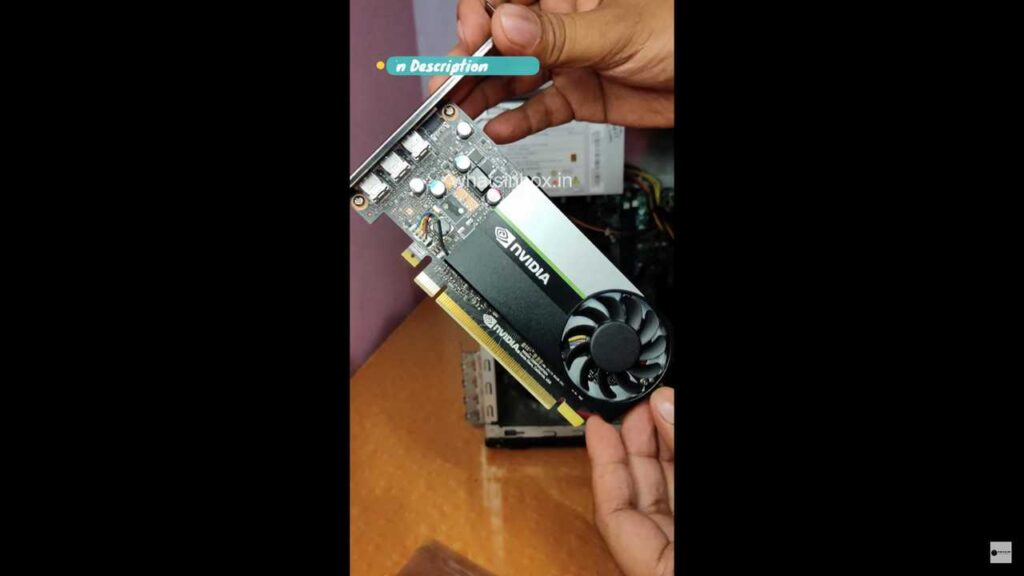
The NVIDIA T400 Graphic Card is a powerful addition to your PC, promising enhanced graphics performance for gaming, content creation, and professional applications. If you’ve just acquired this beast of a GPU and are eager to unlock its potential, this step-by-step guide will walk you through the installation process. From unboxing to updating drivers, we’ve got you covered.
What’s in the Box:
Before diving into the installation process, let’s take a quick look at what you’ll find in the NVIDIA T400 box:
- NVIDIA T400 Graphics Card: The star of the show, this powerful GPU is at the core of your upgraded graphics experience.
- User Manual: A comprehensive guide that provides essential information about the installation process, system requirements, and additional features. NVIDIA Turing Quick Start Guide & NVIDIA Support Guide
- 3 x Mini DisplayPort cables: 3 mini DisplayPort to DisplayPort Adapters
- Brackets: Unattached Low-Profile (SFF) Bracket
Step-by-Step Installation Guide:
Now, let’s go through the installation process for the NVIDIA T400 Graphic Card:
Step 1: Prepare Your Work Area: Ensure that your PC is turned off and unplugged. Choose a well-lit and spacious area to work in. Antistatic precautions are recommended to prevent any static electricity discharge that could potentially harm your components.
Step 2: Identify the PCI Express Slot: Locate an available PCI Express (PCIe) slot on your motherboard. The NVIDIA T400 is likely a PCIe x16 card, so find a corresponding slot.
Step 3: Remove the PC Case Side Panel: Open your PC case by removing the side panel. Most cases have thumbscrews or screws securing the panel. Once removed, you’ll have easy access to the internals.
Step 4: Ground Yourself: Before handling the graphics card, ground yourself to discharge any static electricity. You can do this by touching a metal part of the PC case.
Step 5: Install the Graphics Card: Carefully insert the T400 into the PCIe x16 slot on the motherboard. Align the card with the slot and gently push it down until you hear a click. Ensure that the card is securely seated in the slot.
Step 6: Secure the Card: Use the screws or brackets provided with your case to secure the graphics card in place. This ensures stability and prevents any movement during operation.
Step 7: Connect Power: If your T400 requires additional power, connect the appropriate power cables from your power supply to the connectors on the graphics card.
Step 8: Close the Case: After ensuring that everything is securely connected, close the PC case by reattaching the side panel.
Step 9: Download and Install Drivers: Turn on your PC and insert the driver disc if provided. Follow the on-screen instructions to install the necessary drivers. Alternatively, visit the official NVIDIA website to download the latest drivers for the T400.
Step 10: Update Graphics Card Settings: Once the drivers are installed, open the NVIDIA Control Panel to configure graphics settings according to your preferences. This includes resolution, refresh rate, and additional features.
Congratulations! You’ve successfully installed the NVIDIA T400 Graphic Card in your PC, and now you’re ready to experience enhanced graphics performance across various applications.
Note: Always refer to the user manual specific to your graphics card and motherboard for detailed instructions and compatibility information.
Conclusion:
The NVIDIA T400 Graphic Card is a powerhouse that can elevate your PC’s visual experience. By following this step-by-step installation guide, you’ve ensured a smooth and secure integration of the T400 into your system. Now, immerse yourself in stunning graphics, seamless gameplay, and optimized performance, courtesy of the NVIDIA T400.
Where to buy
NVIDIA T400 4GB GDDR6 Graphics Card — https://amzn.to/42k1R7E